






Home Blog Page 542

BIOS ASROCK SKYLAKE ” SKY OC” NON-K SERI Z170

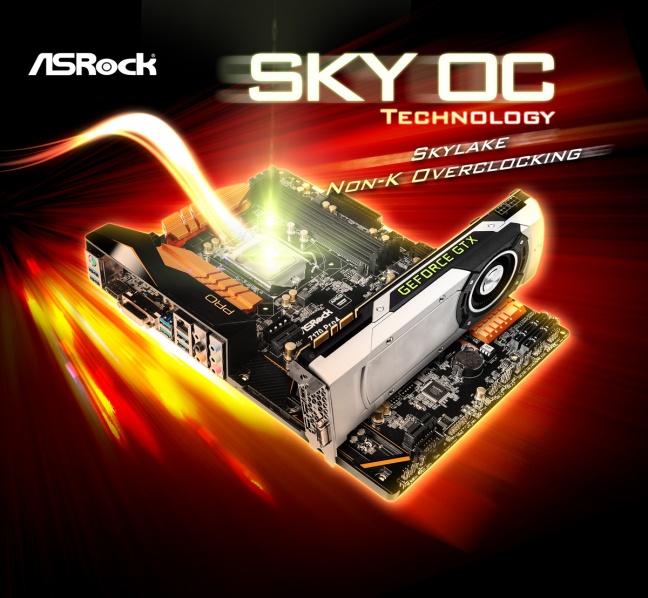
TAIPEI, Taiwan, 15 Desember 2015 –  Intel ® Skylake K series CPU merupakan target daftar keinginan setiap overclocker, karena saat ini Processor yang tidak mungkin di OC jadi kenyataan, karena dengan mudah untuk overclock CPU frekuensi, ASRock telah menyiapkan hadiah Natal yang bagus untuk komunitas overclocking bernama SKY OC, alternatif bagi pengguna untuk overclock setiap Intel ® Skylake i3/i7/i5 atau bahkan Pentium bebas K CPU pada motherboard. ASRock Z170

Insinyur ASRock sudah berpikir selain modul memori DDR4, mungkin ada cara lain untuk overclock Intel ®Non-K tanpa mengutak-atik multiplier di bios. Jadi ASrock mempermudah para overclocker hanya dengan mengubah di  SKY OC yang dapat diperoleh hanya dengan mengUpgarad BIOS dari website resmi ASRock. .Tes laboratorium menunjukkan bahwa sebelumya tidak overclockable Intel ® Core i5-6400CPU sekarang dapat overclocked sampai dengan meningkatkan frekuensi 60% SKYOC pada ASRock Z170 Pro4!

Seseorang mungkin bertanya, “ini terlalu bagus untuk menjadi benar, apa yang menangkap?” Nah, jika Anda harus bertanya, ada dua unnoticeable keterbatasan. Yang pertama adalah onboard Intel ® graphics akan dinonaktifkan sementara Sky Oc diterapkan, berarti bahwa pengguna diminta untuk menginstal kartu grafis. Pembatasan kedua adalah bahwa rasio Turbo CPU dan C-negara juga akan dinonaktifkan.

Sementara ASRock SKY OC memberi kehidupan ke CPUIntel ® bebas seri K , dimana saat ini masih eksklusif untuk motherboard dengan Intel Z170 chipset. Tetapi ASrock memiliki Insinyur yang sangat terampil, cepat atau lambat ini adalah hadiah Natal dari ASRock

Daftar Versi Bios untuk mendukung SKY OC:

Model BIOS Model BIOS
Z170 OC Formula L1.92 Z170M Pro4 L2.23
Z170 Extreme7+ L2.16 Z170M Pro4S L2.23
Z170 Extreme6+ L1.82 Z170M-ITX/ac L1.83
Z170 Extreme6 L1.82 Z170A-X1/3.1 L1.31
Z170 Extreme4+ L2.01 Z170 Professional Gaming i7 L1.14
Z170 Extreme4 L2.43 Z170 Gaming K6+ L1.92
Z170 Extreme3 L1.61 Z170 Gaming K6 L1.92
Z170M Extreme4 L1.35 Z170 Gaming K4 L2.23
Z170 Pro4 L2.83 Z170 Gaming K4/D3 L1.51
Z170 Pro4/D3 L1.74 Z170 Gaming-ITX/ac L1.53
Z170 Pro4S L2.73


Disclaimer:

1. Intel iGPU, CPU Turbo Ratio, AVX and C-State fungsi akan dinonaktifkan bila menjalankan SKY OC, pakai  kartu VGA  lain bila diperlukan.

2. For Z170M PRO4S / Z170M-ITX/ac / Z170M Pro4 / Z170M Extreme4, suhu CPU tidak bisa membaca ketika menjalankan SKY OC.

3. hasil overclocking dapat bervariasi antara berbagai CPU dan konfigurasi hardware configurations.

4. karena untuk hardware/firmware harus di Update atau alasan lain, ketersediaan Sky OC adalah dapat berubah tanpa pemberitahuan terlebih dahulu.

5. Ada risiko tertentu terlibat dengan overclocking, seperti merusak CPU, memori modul, kabel listrik, atau mendestabilisasi sistem. Itu harus dilakukan pada biaya Anda sendiri. Jika Anda tidak yakin tentang risiko overclocking, silakan mencari nasihat profesional.



BIOS ASROCK SKYLAKE ” SKY OC” NON-K SERI Z170

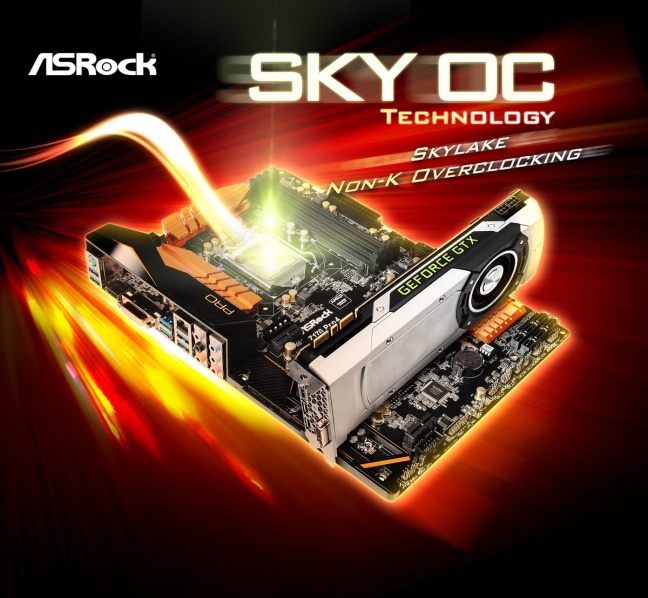
TAIPEI, Taiwan, 15 Desember 2015 –  Intel ® Skylake K series CPU merupakan target daftar keinginan setiap overclocker, karena saat ini Processor yang tidak mungkin di OC jadi kenyataan, karena dengan mudah untuk overclock CPU frekuensi, ASRock telah menyiapkan hadiah Natal yang bagus untuk komunitas overclocking bernama SKY OC, alternatif bagi pengguna untuk overclock setiap Intel ® Skylake i3/i7/i5 atau bahkan Pentium bebas K CPU pada motherboard. ASRock Z170

Insinyur ASRock sudah berpikir selain modul memori DDR4, mungkin ada cara lain untuk overclock Intel ®Non-K tanpa mengutak-atik multiplier di bios. Jadi ASrock mempermudah para overclocker hanya dengan mengubah di  SKY OC yang dapat diperoleh hanya dengan mengUpgarad BIOS dari website resmi ASRock. .Tes laboratorium menunjukkan bahwa sebelumya tidak overclockable Intel ® Core i5-6400CPU sekarang dapat overclocked sampai dengan meningkatkan frekuensi 60% SKYOC pada ASRock Z170 Pro4!

Seseorang mungkin bertanya, “ini terlalu bagus untuk menjadi benar, apa yang menangkap?” Nah, jika Anda harus bertanya, ada dua unnoticeable keterbatasan. Yang pertama adalah onboard Intel ® graphics akan dinonaktifkan sementara Sky Oc diterapkan, berarti bahwa pengguna diminta untuk menginstal kartu grafis. Pembatasan kedua adalah bahwa rasio Turbo CPU dan C-negara juga akan dinonaktifkan.

Sementara ASRock SKY OC memberi kehidupan ke CPUIntel ® bebas seri K , dimana saat ini masih eksklusif untuk motherboard dengan Intel Z170 chipset. Tetapi ASrock memiliki Insinyur yang sangat terampil, cepat atau lambat ini adalah hadiah Natal dari ASRock

Daftar Versi Bios untuk mendukung SKY OC:

Model BIOS Model BIOS
Z170 OC Formula L1.92 Z170M Pro4 L2.23
Z170 Extreme7+ L2.16 Z170M Pro4S L2.23
Z170 Extreme6+ L1.82 Z170M-ITX/ac L1.83
Z170 Extreme6 L1.82 Z170A-X1/3.1 L1.31
Z170 Extreme4+ L2.01 Z170 Professional Gaming i7 L1.14
Z170 Extreme4 L2.43 Z170 Gaming K6+ L1.92
Z170 Extreme3 L1.61 Z170 Gaming K6 L1.92
Z170M Extreme4 L1.35 Z170 Gaming K4 L2.23
Z170 Pro4 L2.83 Z170 Gaming K4/D3 L1.51
Z170 Pro4/D3 L1.74 Z170 Gaming-ITX/ac L1.53
Z170 Pro4S L2.73


Disclaimer:

1. Intel iGPU, CPU Turbo Ratio, AVX and C-State fungsi akan dinonaktifkan bila menjalankan SKY OC, pakai  kartu VGA  lain bila diperlukan.

2. For Z170M PRO4S / Z170M-ITX/ac / Z170M Pro4 / Z170M Extreme4, suhu CPU tidak bisa membaca ketika menjalankan SKY OC.

3. hasil overclocking dapat bervariasi antara berbagai CPU dan konfigurasi hardware configurations.

4. karena untuk hardware/firmware harus di Update atau alasan lain, ketersediaan Sky OC adalah dapat berubah tanpa pemberitahuan terlebih dahulu.

5. Ada risiko tertentu terlibat dengan overclocking, seperti merusak CPU, memori modul, kabel listrik, atau mendestabilisasi sistem. Itu harus dilakukan pada biaya Anda sendiri. Jika Anda tidak yakin tentang risiko overclocking, silakan mencari nasihat profesional.

Team Group Introduces All New L3 EVO SSD with Upgraded Capacity & Performance

Your First & Smartest Choice for Breathing New Life
into Your Computer

The world’s leading memory brand, Team Group today launches an all new SSD – L3 EVO. L3 EVO SSD is using the new generation SATA II 6Gb/s transferring interface which has excellent transferring efficiency and compatibility to satisfy requirements from any kind of motherboard, notebook and embedded device. With the development of the latest processor platform, demand for SSD is also increasing day by day in the market. The ultra high cost-performance SSD – L3 EVO will shock the industry and boost your computer to the next level in storage performance. It is powered by a quad-core, 8-channel controller chip and SATA 3.0 (6Gb/s). Not only it can fully demonstrate its powerful performance, but also has a smooth read/write speed. The speed and performance of the entire system will be upgraded with write speed of up to 530MB/s, and read speed of up to 500MB/s(480/960GB). It is able to accelerate the processing speed of consumer’s computer. With more free time after work, people are also able to enjoy life and spend quality time with families and friends.


Consumers are often frustrated with poor PC performance. The key problem is not caused by poor CPU efficiency, but by slow hard drive read speed. Therefore, choosing an easy upgrade solution will definitely affect user’s work efficiency. L3 EVO SSD not only provides the best data read/write performance and lower power consumption, but its silent operation also brings users an ideal operating experience. With its compact, thin and light design, the 2.5 inch size can be installed on any compact laptops. There are 120GB/240GB/480GB/960GB, 4 capacities available for consumers’ different needs. Upgrading to L3 EVO SSD is not only your smartest choice, but also breathes new life into your PC by speeding up its boot/shutdown time and enhancing multi-tasking performance.


L3 EVO: http://www.teamgroupinc.com/en/product/SSDSeries/Consumer%20SSD/L3%20EVO


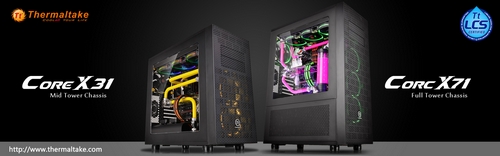
THERMALTAKE UNVEILS THE CORE X71 AND CORE X31 CHASSIS AT CES 2016 TAKING THE CORE SERIES TO THE NEXT LEVEL

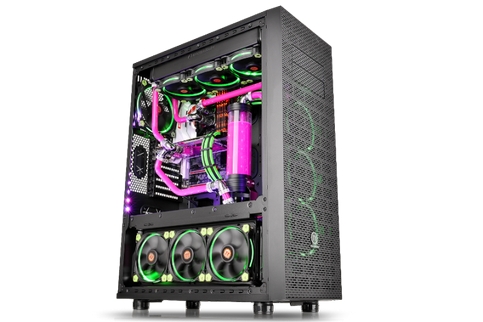
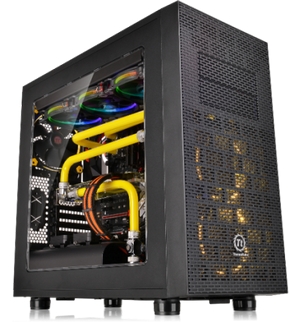
Thermaltake unveils two new members to the Core Series case line at CES 2016, the Core X71 full tower chassis and the Core X31 mid-tower chassis
 
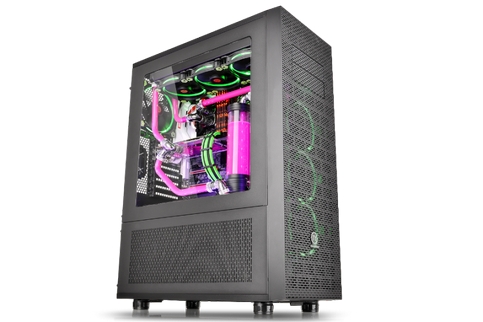
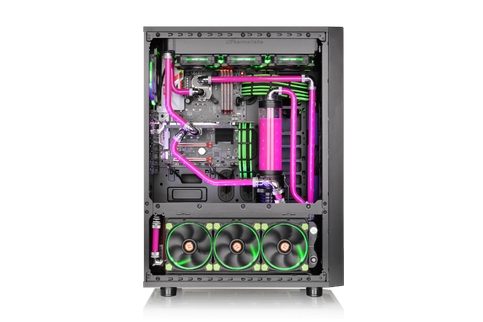
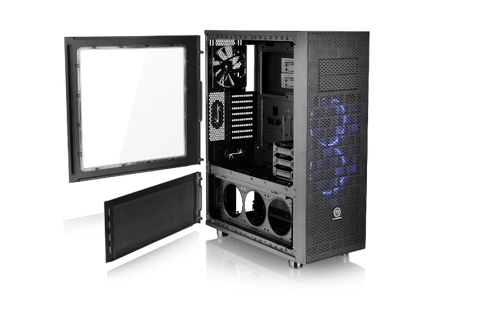
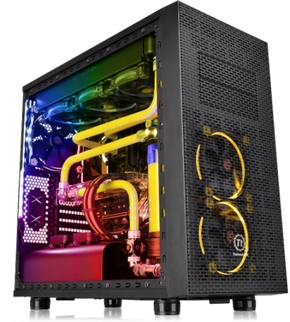
Las Vegas, United States-January 5th, 2016-Thermaltake unveils two new members to the Core Series case line at CES 2016, the Core X71 full tower chassis and the Core X31 mid-tower chassis. With its groundbreaking interior design, the Core X71 delivers a streamlined experience making it easier for PC makers and hobbyists to put together high-end systems. Offering full assembly capacity and expandability for enthusiasts to create massive liquid cooling systems, the Core X71 provides more interior space for custom cooling components with an adjustable HDD cage. The Core X31 features outstanding cooling performance with compatibility for liquid cooling components. With its unprecedented space for high-end hardware and liquid cooling expansion, the Core X31 also supports the latest ATX, Micro ATX, Mini-ITX motherboards, and all high-end GPU cards.
The Core X71 and Core X31 are available in United States (Newegg), Germany (Alternate), United Kingdom (SCAN), and Australia & New Zealand (mWave). Further information from Thermaltake at CES 2016 is available on our dedicated CES 2016 website: http://ces2016.thermaltake.com
The Core X71 and the Core X31 deliver the best viewing presentation with an enlarged side panel window. Moreover, the Core X31’s integrated power cover helps tidy the entire bottom area by allowing users to easily organize unused cables, and in turn provide the maximum interior space needed for advance cooling performance or liquid system build.

Exclusively “Tt LCS Certified”
Tt LCS Certified is a Thermaltake exclusive certification applied to products that pass the design and rigorous hardcore enthusiast standards that only the world’s best LCS chassis are held to. The Tt LCS certification was created so that Thermaltake can clearly convey to power users and enthusiasts which chassis are built and tested to be best compatible under extreme liquid cooling configurations. This ensures users get the best performance, compatibility and features.
Core X71 Full Tower Chassis Features:

Dual- Chamber Design
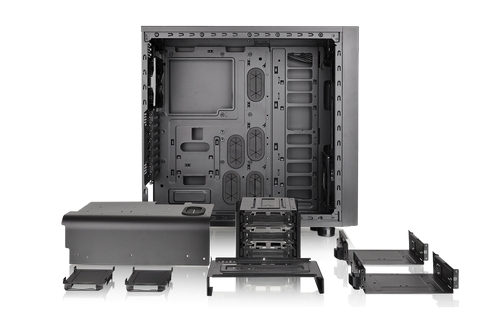
Optimized for space management, the Core X71 is divided into two main chambers: the upper chamber for cooling performance and better efficiency, and the lower one for PSU, case fans, radiators, and the HDD cage. The removable 2.5”/3.5” drive device racks give assemblers plenty of flexibility to gain the maximum interior space needed for advanced cooling performance or liquid systems build.
Fully Modular Concept
A “2 + 5” drive bay design for storage devices makes setting up the latest storage solution super easy and flexible. Besides hanging 3 x 3.5”/2.5” at the back of motherboard tray, users are capable of freely adjusting the 3.5” hard-drive cage within the upper chamber or to the lower chamber to suit their particular needs.
High-End Complete Solution
Featuring a width of 250mm, the Core X71’s unparalleled cooling ability offers fan brackets with various mounting points to support any type of gaming system that can be accommodated, including DIY/AIO liquid-cooling systems and air-cooling units. Two Riing 140mm fans are pre-installed on the front side; a rear 140mm fan guarantees proper ventilation. Each side on the lower chamber of the chassis can support radiators up to 360mm and multiple case fans.
Core X31 Mid-Tower Chassis Features:
Fully Modular Concept
A “2 + 3” drive bay design for storage devices makes setting up the latest storage solution super easy and flexible. Besides hanging 3 x 3.5”/2.5” at the back of motherboard tray, users are capable of freely adjusting the 3.5” hard-drive cage to suit their particular needs.
Dust Reduction
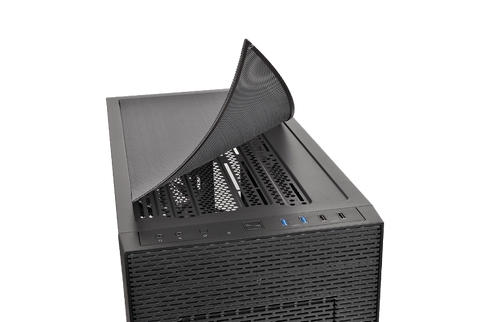
Super-fine fan filters provide excellent protection and minimize the dirt and dust on the top, inside the front-side panel, and at the bottom. A magnetic fan filter on the top makes it easy to attach the filter for dust filtration.

Advanced Ventilation
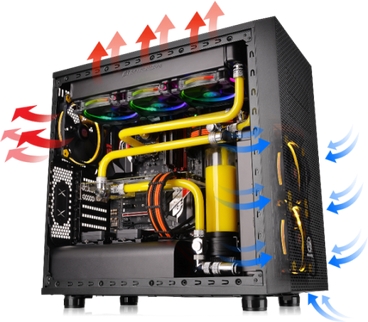
Featuring a width of 250mm, the Core X31 enables users to build a complete high-end system that supports up to triple 120mm, double 140mm liquid cooling radiators or up to 200mm case fans. With extended graphic card support (up to 420mm), the Core X31 protects the hardware while increasing the CPU’s overclocking potential for users looking to get the most out of their hardware. Most importantly, the Core X31 gains more for custom cooling components to freely interchange HDD cage sections for maximum cable management space with adjustable drive racks.

Recent Posts